01 01 01 PROC SQL Basics

PROC SQL  is SAS' implementation of Structured Query Language (SQL), which is a standardized language that is widely used to retrieve and update data in tables and in views that are based on those tables.

The following chart shows terms used in data processing, SAS, and SQL that are synonymous. The SQL terms are used in this lesson.


Data Processing SAS SQL
file SAS data set table
record  observation row
field variable column


PROC SQL can often be used as an alternative to other SAS procedures or the DATA step. You can use PROC SQL to
  • retrieve data from and manipulate SAS tables
  • add or modify data values in a table
  • add, modify, or drop columns in a table
  • create tables and views
  • join multiple tables (whether or not they contain columns with the same name)
  • generate reports.

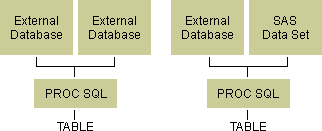
Like other SAS procedures, PROC SQL also enables you to combine data from two or more different types of data sources and present them as a single table. For example, you can combine data from two different types of external databases, or you can combine data from an external database and a SAS data set. 


External databases and SAS Data Set boxes


How PROC SQL Is Unique

PROC SQL differs from most other SAS procedures in several ways:

  • Unlike other PROC statements, many statements in PROC SQL are composed of clauses. For example, the following PROC SQL step contains two statements: the PROC SQL statement and the SELECT statement. The SELECT statement contains several clauses: SELECT, FROM, WHERE, and ORDER BY.
     proc sql;
        select empid,jobcode,salary,
               salary*.06 as bonus
           from sasuser.payrollmaster
           where salary<32000
           order by jobcode;
  • The PROC SQL step does not require a RUN statement. PROC SQL executes each query automatically. If you use a RUN statement with a PROC SQL step, SAS ignores the RUN statement, executes the statements as usual, and generates the note shown below in the SAS log.

SAS Log
1884 proc sql;
1885    select empid,jobcode,salary,
1886           salary*.06 as bonus
1887       from sasuser.payrollmaster
1888       where salary<32000
1889       order by jobcode;
1890 run;
NOTE: PROC SQL statements are executed immediately;
The RUN statement has no effect.


  • Unlike many other SAS procedures, PROC SQL continues to run after you submit a step. To end the procedure, you must submit another PROC step, a DATA step, or a QUIT statement, as shown:
         proc sql;
            select empid,jobcode,salary,
                   salary*.06 as bonus
               from sasuser.payrollmaster
               where salary<32000
               order by jobcode;
         quit;

When you submit a PROC SQL step without ending it, the status line displays the message PROC SQL running.